





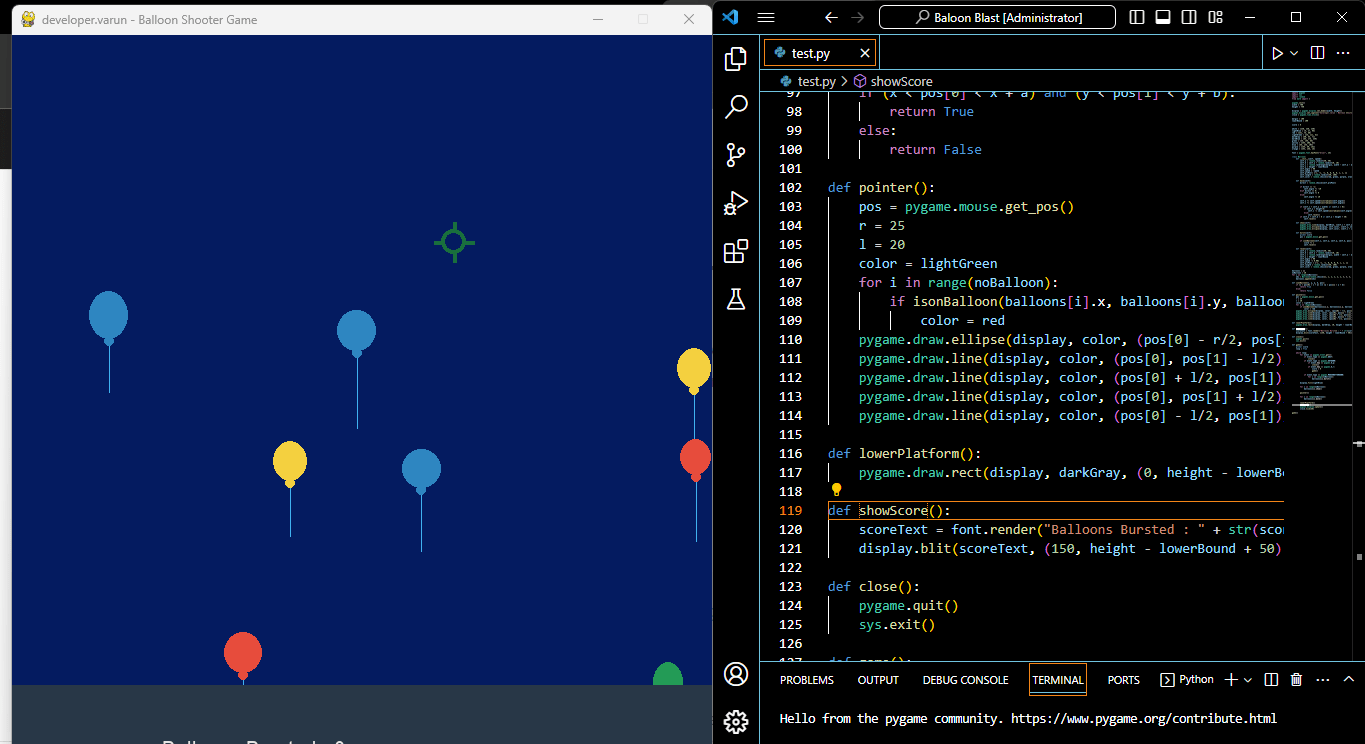
The “Balloon Blast Game” using Python is a simple arcade-style game project where the player’s objective is to shoot and pop balloons that appear on the screen. The game is implemented using the Pygame library, which is a popular library for creating 2D games in Python. Here’s a general description of the game:
Objective: Pop as many balloons as possible to score points.
Gameplay
- Balloons of different colors and sizes appear randomly at the top of the game screen.
- The player controls a cursor (usually a crosshair) using the mouse.
- By clicking on a balloon with the cursor, the player can pop it.
- Each popped balloon awards the player with points.
- The game continues until the player decides to quit or until a certain time limit is reached.
- The player’s score is displayed on the screen.
Features
- Balloons move in random directions or follow predefined paths.
- Balloons may have different point values based on their size or color.
- Sound effects and background music can be added to enhance the gaming experience.
- The game can have multiple levels with increasing difficulty.
It’s a straightforward and fun game that serves as a good starting point for learning game development in Python, especially with the Pygame library. Developers can customize and expand upon this basic concept to create more complex and engaging games with various challenges and features.
Install pygame Library
The “Balloon Blast Game” using Python, as described in your previous text, can be implemented using the Pygame library. Pygame is a popular library for creating 2D games in Python, and it provides the necessary functions and features for game development, including handling graphics, input, sound, and more.
To create the game, you’ll need to install the Pygame library. You can install it using pip, the Python package manager, by running the following command in your terminal or command prompt:
pip install pygameOnce Pygame is installed, you can use it to handle game graphics, input from the mouse and keyboard, and other game-related functionalities. It simplifies the process of creating 2D games in Python and is a suitable choice for developing the “Balloon Blast Game” you mentioned.
Python Code
import pygame
import sys
import random
from math import *

pygame.init()
width = 700
height = 750

display = pygame.display.set_mode((width, height))
pygame.display.set_caption("developer.varun - Balloon Shooter Game")
clock = pygame.time.Clock()

margin = 100
lowerBound = 100

score = 0

white = (230, 230, 230)
lightBlue = (4, 27, 96)
red = (231, 76, 60)
lightGreen = (25, 111, 61)
darkGray = (40, 55, 71)
darkBlue = (64, 178, 239)
green = (35, 155, 86)
yellow = (244, 208, 63)
blue = (46, 134, 193)
purple = (155, 89, 182)
orange = (243, 156, 18)

font = pygame.font.SysFont("Arial", 25)

class Balloon:
    def __init__(self, speed):
        self.a = random.randint(30, 40)
        self.b = self.a + random.randint(0, 10)
        self.x = random.randrange(margin, width - self.a - margin)
        self.y = height - lowerBound
        self.angle = 90
        self.speed = -speed
        self.proPool= [-1, -1, -1, 0, 0, 0, 0, 1, 1, 1]
        self.length = random.randint(50, 100)
        self.color = random.choice([red, green, purple, orange, yellow, blue])

    def move(self):
        direct = random.choice(self.proPool)

        if direct == -1:
            self.angle += -10
        elif direct == 0:
            self.angle += 0
        else:
            self.angle += 10

        self.y += self.speed*sin(radians(self.angle))
        self.x += self.speed*cos(radians(self.angle))

        if (self.x + self.a > width) or (self.x < 0):
            if self.y > height/5:
                self.x -= self.speed*cos(radians(self.angle))
            else:
                self.reset()
        if self.y + self.b < 0 or self.y > height + 30:
            self.reset()

    def show(self):
        pygame.draw.line(display, darkBlue, (self.x + self.a/2, self.y + self.b), (self.x + self.a/2, self.y + self.b + self.length))
        pygame.draw.ellipse(display, self.color, (self.x, self.y, self.a, self.b))
        pygame.draw.ellipse(display, self.color, (self.x + self.a/2 - 5, self.y + self.b - 3, 10, 10))

    def burst(self):
        global score
        pos = pygame.mouse.get_pos()

        if isonBalloon(self.x, self.y, self.a, self.b, pos):
            score += 1
            self.reset()

    def reset(self):
        self.a = random.randint(30, 40)
        self.b = self.a + random.randint(0, 10)
        self.x = random.randrange(margin, width - self.a - margin)
        self.y = height - lowerBound
        self.angle = 90
        self.speed -= 0.002
        self.proPool = [-1, -1, -1, 0, 0, 0, 0, 1, 1, 1]
        self.length = random.randint(50, 100)
        self.color = random.choice([red, green, purple, orange, yellow, blue])

balloons = []
noBalloon = 10
for i in range(noBalloon):
    obj = Balloon(random.choice([1, 1, 2, 2, 2, 2, 3, 3, 3, 4]))
    balloons.append(obj)

def isonBalloon(x, y, a, b, pos):
    if (x < pos[0] < x + a) and (y < pos[1] < y + b):
        return True
    else:
        return False

def pointer():
    pos = pygame.mouse.get_pos()
    r = 25
    l = 20
    color = lightGreen
    for i in range(noBalloon):
        if isonBalloon(balloons[i].x, balloons[i].y, balloons[i].a, balloons[i].b, pos):
            color = red
    pygame.draw.ellipse(display, color, (pos[0] - r/2, pos[1] - r/2, r, r), 4)
    pygame.draw.line(display, color, (pos[0], pos[1] - l/2), (pos[0], pos[1] - l), 4)
    pygame.draw.line(display, color, (pos[0] + l/2, pos[1]), (pos[0] + l, pos[1]), 4)
    pygame.draw.line(display, color, (pos[0], pos[1] + l/2), (pos[0], pos[1] + l), 4)
    pygame.draw.line(display, color, (pos[0] - l/2, pos[1]), (pos[0] - l, pos[1]), 4)

def lowerPlatform():
    pygame.draw.rect(display, darkGray, (0, height - lowerBound, width, lowerBound))

def showScore():
    scoreText = font.render("Balloons Bursted : " + str(score), True, white)
    display.blit(scoreText, (150, height - lowerBound + 50))

def close():
    pygame.quit()
    sys.exit()

def game():
    global score
    loop = True

    while loop:
        for event in pygame.event.get():
            if event.type == pygame.QUIT:
                close()
            if event.type == pygame.KEYDOWN:
                if event.key == pygame.K_q:
                    close()
                if event.key == pygame.K_r:
                    score = 0
                    game()

            if event.type == pygame.MOUSEBUTTONDOWN:
                for i in range(noBalloon):
                    balloons[i].burst()

        display.fill(lightBlue)

        for i in range(noBalloon):
            balloons[i].show()

        pointer()

        for i in range(noBalloon):
            balloons[i].move()

        lowerPlatform()
        showScore()
        pygame.display.update()
        clock.tick(60)

game()
Download Full Project:
Download Full Project
Resource ready for free download! Sign up with your email to get instant access.The code i provided is for a simple game called “Balloon Blast” implemented using the Pygame library in Python. Here’s a brief overview of what the code is doing:
Initialization:
- It initializes the Pygame library and sets up the game window with a specific width and height.
- Various colors and fonts are defined for later use.
- A class called
Balloonis defined to represent balloons in the game.
Balloon Class:
- The
Balloonclass represents individual balloons that appear in the game. - Balloons have properties such as size (
aandb), position (xandy), angle, speed, color, and more. - Balloons can move in different directions based on their angle and speed.
- When a balloon is clicked by the player’s mouse cursor, it bursts, and the player’s score increases.
Game Initialization:
- It initializes a list of
Balloonobjects to create a set of balloons. - The game loop is set up, which continuously updates the game’s state and renders it on the screen.
Game Loop:
- The game loop is the heart of the game. It runs continuously until the player decides to quit.
- Inside the loop, the following happens:
- Event handling: The code listens for various events such as mouse clicks and key presses.
- Rendering: It draws the balloons on the game window, updates their positions, and displays the player’s score.
- Collision detection: It checks if the player clicked on a balloon and increases the score accordingly.
- Lower platform: It draws a lower platform at the bottom of the screen.
Closing the Game:
- The game can be closed either by clicking the window’s close button or by pressing ‘q’ on the keyboard.
- Pressing ‘r’ on the keyboard resets the player’s score and starts a new game.
Final Words
The code provides the basic mechanics for a simple balloon-shooting game where the player clicks on balloons to burst them and tries to achieve a higher score. It demonstrates the usage of Pygame for game development in Python. Players can try to improve upon this base code by adding more features, levels, and challenges to make it a complete game.