




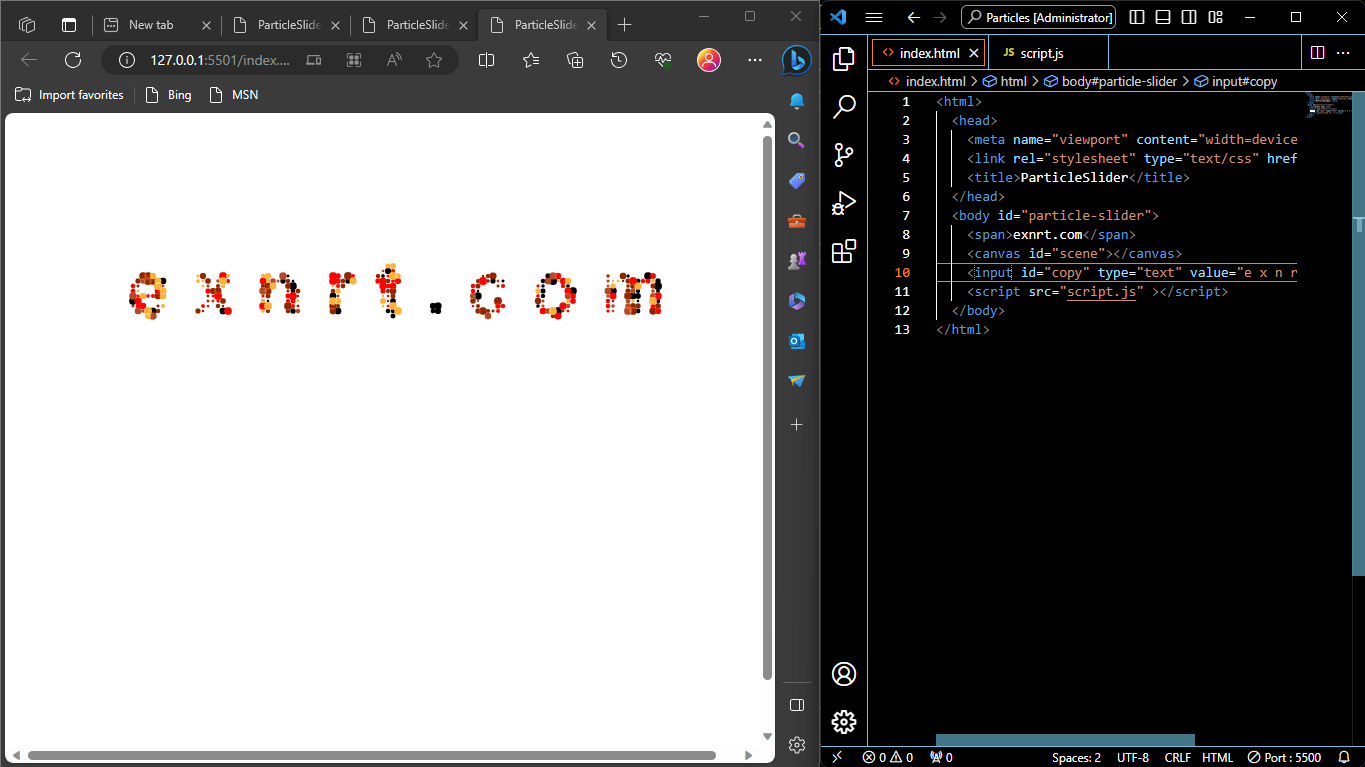
This project about creating a visually engaging and interactive web-based animation or art installation. In this project, the particles are used to create text characters, and their movement and behavior are influenced by the position and movement of the cursor.
Key Points
Key elements and concepts in this project include:
- Particles: The individual elements of the animation are text characters, forming a dynamic and visually appealing representation.
- Cursor Responsiveness: The particles react to the cursor’s position and movement. This interaction creates an engaging and dynamic visual effect.
- Animation: The text particles are animated in response to the cursor, making the project visually interesting and interactive.
- Artistic Expression: The project may be an art form, a creative experiment, or a visual representation of a concept, and it could serve various artistic and aesthetic purposes.
Html Code
<html>
  <head>
    <meta name="viewport" content="width=device-width" />
    <link rel="stylesheet" type="text/css" href="style.css" />
    <title>ParticleSlider</title>
  </head>
  <body id="particle-slider">
    <span>exnrt.com</span>
    <canvas id="scene"></canvas>
    <input id="copy" type="text" value="e x n r t . c o m" />
    <script src="script.js" ></script>
  </body>
</html>
JavaScript Code:
var canvas = document.querySelector("#scene"),
  ctx = canvas.getContext("2d"),
  particles = [],
  amount = 0,
  mouse = {x:0,y:0},
  radius = 0.5;

var colors = ["#ff0000","#000000", "#FFB03B","#B64926", "#8E2800"];

var copy = document.querySelector("#copy");

var ww = canvas.width = window.innerWidth;
var wh = canvas.height = window.innerHeight;

function Particle(x, y) {
    this.x = Math.random() * ww;
    this.y = Math.random() * wh;
    this.dest = {
      x: x,
      y: y
    };
    this.r = Math.random() * 3 + 1; // Adjust the size range here (min: 1, max: 4)
    this.vx = (Math.random() - 0.5) * 20;
    this.vy = (Math.random() - 0.5) * 20;
    this.accX = 0;
    this.accY = 0;
    this.friction = Math.random() * 0.05 + 0.94;

    this.color = colors[Math.floor(Math.random() * 6)];
  }

Particle.prototype.render = function() {


  this.accX = (this.dest.x - this.x)/1000;
  this.accY = (this.dest.y - this.y)/1000;
  this.vx += this.accX;
  this.vy += this.accY;
  this.vx *= this.friction;
  this.vy *= this.friction;

  this.x += this.vx;
  this.y +=  this.vy;

  ctx.fillStyle = this.color;
  ctx.beginPath();
  ctx.arc(this.x, this.y, this.r, Math.PI * 2, false);
  ctx.fill();

  var a = this.x - mouse.x;
  var b = this.y - mouse.y;

  var distance = Math.sqrt( a*a + b*b );
  if(distance<(radius*70)){
    this.accX = (this.x - mouse.x)/100;
    this.accY = (this.y - mouse.y)/100;
    this.vx += this.accX;
    this.vy += this.accY;
  }

}

function onMouseMove(e){
  mouse.x = e.clientX;
  mouse.y = e.clientY;
}

function onTouchMove(e){
  if(e.touches.length > 0 ){
    mouse.x = e.touches[0].clientX;
    mouse.y = e.touches[0].clientY;
  }
}

function onTouchEnd(e){
mouse.x = -9999;
mouse.y = -9999;
}

function initScene(){
  ww = canvas.width = window.innerWidth;
  wh = canvas.height = window.innerHeight;

  ctx.clearRect(0, 0, canvas.width, canvas.height);

  ctx.font = "bold "+(ww/10)+"px sans-serif";
  ctx.textAlign = "center";
  ctx.fillText(copy.value, ww / 2, wh / 2 * 0.6);

  var data  = ctx.getImageData(0, 0, ww, wh).data;
  ctx.clearRect(0, 0, canvas.width, canvas.height);
  ctx.globalCompositeOperation = "screen";

  particles = [];
  for(var i=0;i<ww;i+=Math.round(ww/150)){
    for(var j=0;j<wh;j+=Math.round(ww/150)){
      if(data[ ((i + j*ww)*4) + 3] > 150){
        particles.push(new Particle(i,j));
      }
    }
  }
  amount = particles.length;

}

function onMouseClick(){
  radius++;
  if(radius ===5){
    radius = 0;
  }
}

function render(a) {
  requestAnimationFrame(render);
  ctx.clearRect(0, 0, canvas.width, canvas.height);
  for (var i = 0; i < amount; i++) {
    particles[i].render();
  }
};

copy.addEventListener("keyup", initScene);
window.addEventListener("resize", initScene);
window.addEventListener("mousemove", onMouseMove);
window.addEventListener("touchmove", onTouchMove);
window.addEventListener("click", onMouseClick);
window.addEventListener("touchend", onTouchEnd);
initScene();
requestAnimationFrame(render);
Use and Potential
The code i provided is a JavaScript-based project that creates an interactive and visually engaging animation using text particles that respond to the cursor’s movement. This kind of project can have various use cases and potential users, including:
- Web Developers and Designers: Developers and designers might use this code as a source of inspiration or a starting point for creating interactive and artistic elements on websites or web applications. They can adapt and customize the code to add an interactive component to their web projects.
- Digital Artists: Digital artists can use this code to create unique and visually appealing digital artworks or installations. It allows them to experiment with text and interactivity, adding a dynamic element to their creations.
- Educators: Educators teaching web development, creative coding, or interactive design might use this project as an example to illustrate JavaScript, HTML, and canvas-based animations. It can serve as a teaching tool to help students understand the principles of interactive web development.
- Creative Coders: Those who enjoy creative coding as a hobby or creative outlet may use this code to experiment with interactive visual art. They can modify the code to create unique visual effects and animations.
- Art Galleries and Exhibitions: Art galleries or exhibitions interested in interactive digital installations can potentially use a customized version of this project to engage visitors and create immersive experiences.
- Interactive Storytellers: Storytellers and creators of digital narratives may incorporate this kind of interactive animation into their storytelling to engage their audience in a unique way.
- UI/UX Designers: User interface and user experience (UI/UX) designers could find inspiration in this project for creating engaging and interactive user interfaces or components within applications.
Ultimately, the project’s users can vary widely, from developers and designers looking to enhance web experiences to digital artists and educators seeking creative and educational applications for the code.